Pievienojies SMART NET un ietaupi! Pievienoties

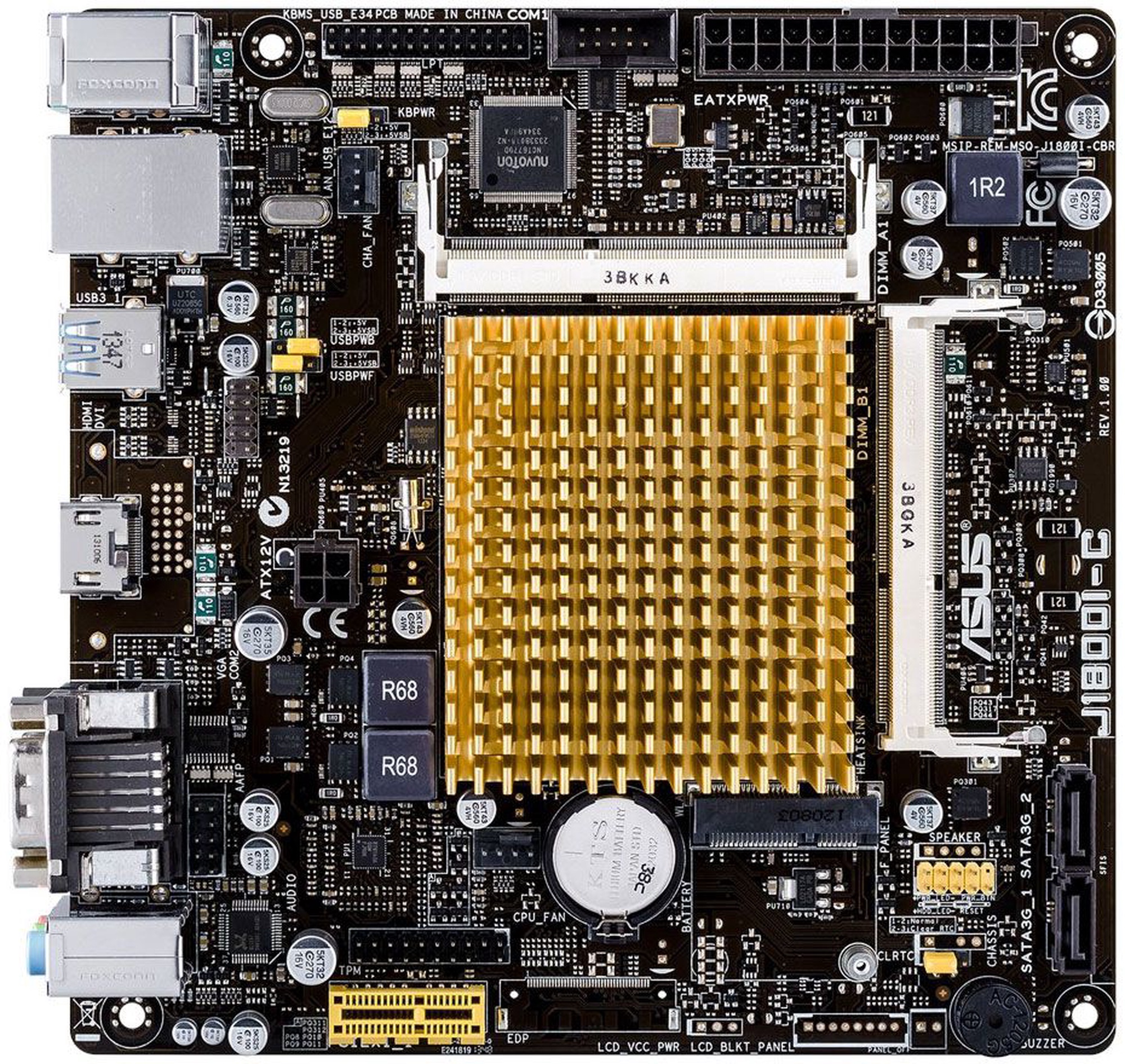
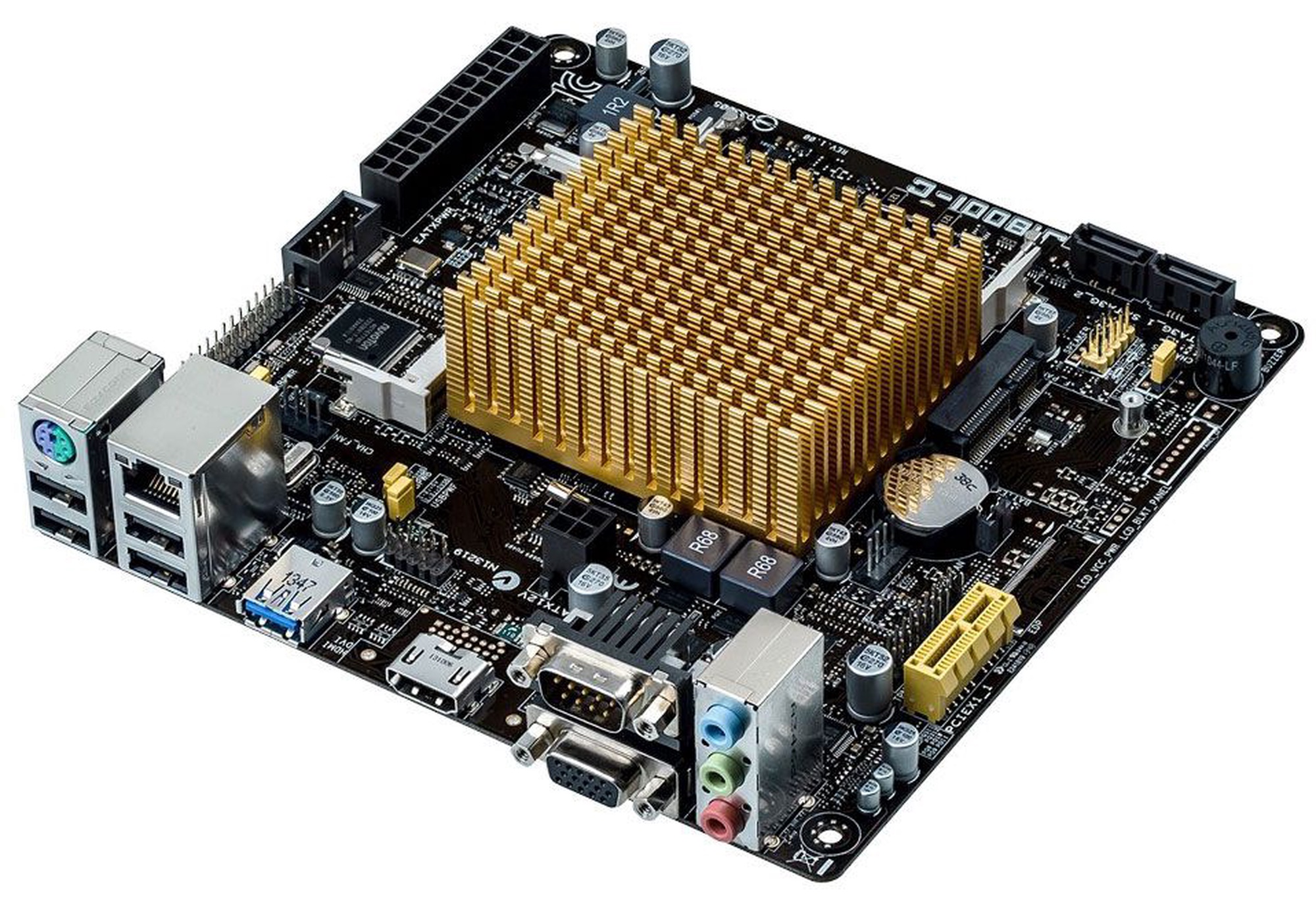
Mātesplate Asus J1800I-C


Atvaino, šī prece šobrīd nav pieejama internetā. Taču piedāvājam pārskatīt citas šīs kategorijas preces – ticam, ka atradīsi līdzīgu preci.

Tāpat vari turpināt iepirkšanos, atgriežoties sākumlapā vai meklēšanas laukā ierakstot, kādu preci meklēji.

Izstrādājuma īpašības

Kopējie parametri

Produkta veids Mātesplates
Zīmols Asus
Modelis J1800I-C

Pamatplates izmēri

Garums 170 mm
Platums 170 mm
Pamatplates izmērs
Pamatplašu jeb mātes plašu galvenais raksturlielums ir formfaktors, kas nosaka kāda tipa sistēmām šī mātes plate būs piemērota. Formfaktors raksturo arī konkrētajai mātes platei pieejamos ieejas/izejas portus, kā arī to izkārtojumu.
Mini-ITX

Procesors

Procesora tips Intel
Procesora ligzdas tips
Procesora (CPU) ligzda ir svarīgs faktors plates izvēlē, jo procesora ligzdai jābūt precīzi savietojamai ar procesoru, kuru vēlaties montēt platē.
BGA 1170

Operatīvā atmiņa

Operatīvās atmiņas ligzdu daudzums
Atmiņas slots (atmiņas ligzda vai RAM slots) ir tas, kas ļauj RAM atmiņai būt ievietotai datorā. Atkarībā no mātes plates, parasti būs divi līdz četri sloti (var arī būt vairāk augstas klases mātes platēm).
2
Operatīvās atmiņas tips
Atmiņas kopne ir paredzēta informācijas pārraidei starp mikroprocesoru un operatīvo atmiņu. Tā nosaka, kāda tipa operatīvo atmiņu uztur attiecīgā pamatplate.
DDR3 (SO-DIMM)
Maksimālais operatīvās atmiņas daudzums (RAM)
Šis rādītājs nosaka, kāds ir jūsu pamatplates maksimālais iespējamais atmiņas apjoms.
8 GB
Operatīvās atmiņas taktiskais biežums
Jo augstāks rādītājs, jo ātrāka informācijas pārraide.
1333 MHz

Audio, video un tīkla karte

Video kartes modelis
Parametrs, kas nosaka, vai pamatplatē ir integrēta videokarte.
Intel® HD Graphics
Skaņas kartes modelis
Šis parametrs nosaka, vai mātes platē ir integrēta skaņas karte.
Realtek ALC887-VD
Tīkla karte
Lokālais tīkls (angļu val. Local Area Network) ir privāts datoru tīkls, kas savieno datorus un citas informācijas apstrādes ierīces.
Realtek RTL8111G
AMD CrossFire
CrossFire ļauj automatizēti paplašināt grafikas veiktspēju, apvienojot vairākas grafikas kartes CrossFire atbalstošā mātes platē. CrossFire darbojas tikai ar ATI bāzes kartēm, kas tiek ražotas CrossFire lietošanai.
Nē
nVidia SLI
SLI (angļu val. Scalable Link Interface) ir grafiskā procesora risinājuma zīmols, ko izstrādājusi NVIDIA, savienojot divas vai vairākas video kartes kopā, lai iegūtu vienu rezultātu.
Nē

Cieto disku un optisko iekārtu pieslēgumi

SATA 3 porti
SATA 3 ir trešās paaudzes SATA saskarne, kas darbojas ar ātrumu 6.0 GB/sek.
0

Paplašinājuma porti

PCI Express 1x savienotāji 2
PCI Express 4X savienotāji 0
PCI Express 16X savienotāji 0
PCI savienojumi
PCI porti ir izplatītākais datora funkcju papildināšanas veids ar papildus kartēm (skaņas, tīkla, komunikāciju, videonovērošanas u.c.). Jaunākajās platēs, pateicoties PCI-EXpress standartam ir neliels PCI paplašināšanas portu skaits, tādēļ pirms iegādāties pamatplati, pārliecinieties, vai PCI portu skaits ļauj ievietot visas jums nepieciešamās PCI kartes.
0

Aizmugurējā paneļa pieslēguma iespējas

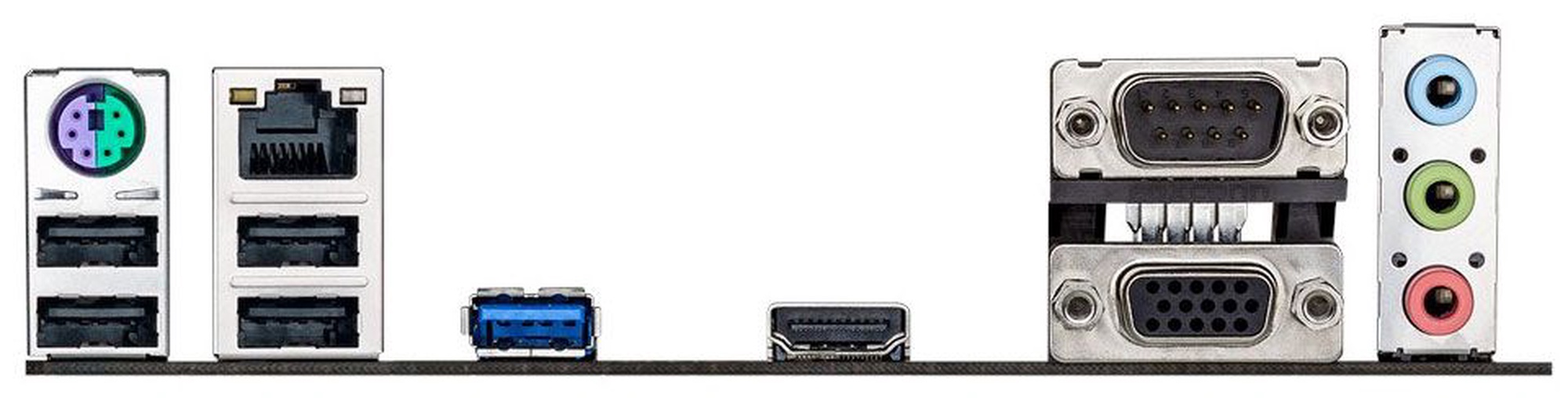
USB 2.0 savienotāju skaits
USB 2.0 ir izplatītākā datora perifērijas ierīču pieslēgvieta. Pateicoties šai pieslēgvietai iespējams pievienot peles, klaviatūras, interneta kameras, printerus, USB zibatmiņas, ārējos cietos diskus un neskaitāmas citas ierīces. Jo vairāk USB porti, jo vairāk ierīces vienlaicīgi var pieslēgt.
4
USB 3.x savienotāju skaits
USB 3.0 ir jaunākais un ātrākais USB standarts, kas ļauj pieslēgt visas iepriekšējās paaudzes USB 2.0 un jaunās paaudzes USB3.0 iekārtas. Jo vairāk USB porti, jo vairāk ierīces vienlaicīgi var pieslēgt.
1
D-Sub savienotāji
D-Sub ir klasiskais (analogais) monitoru pieslēgšanas spraudnis.
1
DVI savienotāji
Vizuālā cipara interfeiss (angļu val. Digital Visual Interface) ir paredzēts savienojumam ar augstas izšķirtspējas monitoru.
0
HDMI pieslēgvietu skaits
Tas ir ciparu savienotājs, ar kura palīdzību var pieslēgt televizoru, projektoru un citas ierīces, kas nodod attēlu portatīvajam datoram. Atšķirībā no VGA, HDMI nodod skaņu un attēlu bez traucējumiem un augstā izšķirtspējā ( HD, Full HD – ja ir pieejams).
1
PS/2 savienojumi
Viens no vadu savienojuma veidiem, kas, piemēram, savieno klaviatūru, peli ar serveri.
1

Papildus

Obligātā garantija 24 mēn
Papildus informācija Iebūvēts procesors Intel® Dual-Core J1800 (2.41 GHz). . ASUS Exclusive Features : AI Suite 3. Ai Charger. Anti-Surge. ASUS UEFI BIOS EZ Mode featuring friendly graphics user interface. Network iControl. USB 3.0 Boost. . ASUS Quiet Thermal Solution : ASUS Fan Xpert. . ASUS EZ DIY : ASUS CrashFree BIOS 3. ASUS EZ Flash 2. ASUS MyLogo 2. . 100% All High-quality Conductive Polymer Capacitors.
Asus J1800I-C
Preces apraksts angļu valodā:

Compact and great value Intel Celeron® J1800 SoC CPU board with HDMI and USB 3.0

  • New UEFI BIOS and EZ Mode: Friendlier, easier, and more intuitive with helpful info added
  • USB 3.0 BOOST (UASP Support): 170% faster transfer speeds than traditional USB 3.0
  • Network iControl: Real-time network bandwidth management
  • CrashFree BIOS 3: Restore corrupted BIOS data from USB storage
  • AI Suite 3: One-stop access to innovative ASUS features

Power efficiency plus high-resolution graphics, thanks to the integrated Intel Celeron® Dual-Core SoC Processor J1800 with HD Graphics support.
This motherboard features an integrated Intel Celeron® Dual-Core Processor J1800 and Intel HD Graphics. This revolutionary 22nm ultra low voltage SoC (System On a Chip) combines superb processing power and advanced HD graphics support in one small, energy efficient design. Despite minimal power requirements, it still has the processing power to display the latest DirectX® 11 HD graphics. It features support for dual independent displays with resolutions up to 2500x1600, and also has integrated USB 3.0 support.

Intel® Smart Connect Technology
Auto application refresh and shorter wait times
Your computer can receive web updates with fresh content for selected applications, even when the system is in sleep mode. This means less time waiting for applications to update and sync with the cloud, leading to a more efficient computing experience.

New UEFI BIOS – friendlier and more intuitive
Exclusive EZ Mode adds useful info to become even easier
Media-renowned UEFI BIOS from ASUS provides the smoothest mouse-controlled graphical BIOS, and now features more intuitive functions to quickly take you to favorite BIOS pages and frequently-accessed settings through custom shortcuts. You can even write quick notes in-BIOS for future reference, view an activity log of setting changes and modifications, and rename SATA ports. EZ Mode has a whole new look, upgraded with extra-friendly capabilities like detailed fan controls, XMP profile settings, SATA information, and fast clock adjustment. Together, these perfect your BIOS experience.

  1. Fast Clock Adjustment - Easily change the time and date in EZ Mode using the mouse.
  2. EZ XMP Settings - Quickly apply XMP settings in UEFI BIOS EZ Mode, achieving better DRAM performance.
  3. EZ Fan Settings - As demanded by the community, detailed fan controls come to EZ Mode so you can switch fan profiles for quick cooling and noise-level supervision.
  4. SATA Information - Displays each SATA port details for you to easily recognize devices.

My Favorites
Get all your favorite functions on one page
F4 or right click to add settings to My Favorites under Advanced Mode, which cuts time spent on searching and further speeds up system tuning.

Shortcut
One press to apply and access frequent settings
Now you can customize your own shortcut log by pressing F4 or right clicking to create shortcuts to frequently-used settings. Instantly access them by simply hitting the F3 hotkey.

Quick Note
You no longer need to have a pen and paper notepad around. Quick Note works inside the BIOS so you can just type remarks and ideas to help you remember important settings info and save time on trial and error.

Last Modified
Always forget those important BIOS changes you did? This friendly function creates a tuning log to track your BIOS settings history, which can be saved onto a USB drive.

SATA Port Renaming
You can rename your SATA ports for easy identification, including by usage scenario. Get greater convenience and spend less time on finding the right devices when you want to change settings.

USB 3.0 Boost (UASP Support)
170% faster transfer speeds than traditional USB 3.0
ASUS USB 3.0 Boost technology supports UASP (USB Attached SCSI Protocol) in Windows 8. With USB 3.0 Boost technology, a USB device's transmission speed is significantly increased up to 170%, adding to already fast USB 3.0 performance. ASUS software automatically accelerates data rates for compatible USB 3.0 peripherals without any user interaction.

  • World’s 1st USB 3.0 UASP support – instantly 170% faster.
  • Complete USB 3.0 solution – performance boost under Turbo Mode or UASP Mode for most USB devices.
  • Simple plug and boost – auto detection design ensures best performance.

Network iControl
Real-time network bandwidth management
One click to prioritize network traffic for applications you're currently using or set up favorite profiles to run at specific times. Avoid network congestion, speed up downloading, and make sure online gaming runs optimized, all through an intuitive user interface.

AI Suite 3
One-stop access to innovative ASUS features
ASUS AI Suite 3 offers a brand new user experience through a clearer and more attractive interface with support for larger monitors. It consolidates all exclusive ASUS features into one simple-to-use package, allowing you to supervise overclocking, energy consumption, fan speeds, voltages and more. This all-in-one app offers diverse and easy to use functionality, with no need to switch back and forth between different utilities.

Fan Xpert
Dedicated CPU and case fan controls
ASUS Fan Xpert intelligently allows you to adjust CPU and case fan speeds according to different ambient temperatures in diverse climate conditions and locations, as well as actual PC loading. Various preset fan performance profiles offer flexible fan speed controls to achieve a quiet and cool environment.

CrashFree BIOS 3
Restore corrupted BIOS data from USB storage
ASUS CrashFree BIOS 3 allows users to restore corrupted BIOS data from a USB flash drive or support CD containing a BIOS file. This utility saves you the cost and hassle of buying a replacement BIOS chip.

EZ Flash 2
Easy BIOS updates from USB outside the OS
Quickly update your BIOS from a USB flash drive before entering the OS. It only takes a few clicks, with no floppy disk or an OS-based flash utility.

Stainless Steel Back I/O
3X more durable corrosion-resistant coating
ASUS motherboard back I/O panels are made from strong and corrosion-resistant stainless steel, which is bonded with a thin layer of chromium oxide to enhance anti-corrosive properties. Passing 72-hour spray salt endurance tests, ASUS stainless steel back I/O panels have a usage life three times longer compared to ordinary panels.

High-Quality 5K-Hour Solid State Capacitors
2.5X longer lifespan with excellent durability
ASUS high-quality solid state capacitors assure a 5,000-hour lifespan, equivalent to 2.5 times longer than traditional capacitors. All capacitors pass testing under temperatures as high as 105 degrees centigrade and meet Japanese industrial standards to provide excellent durability and enhanced thermal capacity.

ASUS Boot Setting
Multiple startup options
Thanks to ASUS Windows 8 hardware optimization, ASUS Boot Setting provides better flexibility in customizing your PC’s startup process. You can shorten system boot-up time to 2-seconds* for a smoother user experience under Windows 8, and even previous versions of Windows. Also, you can enter the BIOS directly with one click through a user-friendly interface, and quickly select your preferred system boot up method: either get to the OS in seconds or opt for regular boot up. Whatever your choice, settings are saved and persistent, with no need to choose every time you power on.
*On select models

GreenASUS
Motherboards are EU Energy-related Products (ErP) ready, which requires products meet high efficiency standards with regards to energy consumption. This is in line with the ASUS vision of creating environmentally-friendly and energy-efficient products through design and innovation that reduce the carbon footprint of products and thus mitigate ecological impact.
Preces krāsa var atšķirties no attēlā redzamās. Produkta apraksts ir vispārīgs, tajā ne vienmēr ir minētas visas produkta īpašības. Produktu cenas e-veikalā var atšķirties no cenām lielveikalos un servisa centros. Preču atlikums noliktavā un e-veikalā var atšķirties, tāpēc šādos gadījumos piegādes nosacījumi var atšķirties no tiem, kas norādīti pasūtījuma veikšanas brīdī un / vai nevarēsim izpildīt Tavu pasūtījumu vai tikai daļēji izpildīt (tādos gadījumos Pircējs tiek informēts nekavējoties). AI Modified - Rediģēts, izmantojot MI

Pamanīji kļūdu preces aprakstā, īpašību tabulā vai attēlu galerijā? Ziņo mums